
SRD SASSA STATUS CHECK
To do an SRD Status Check (also called a SASSA Status Check), enter your South African ID number and cellphone number in the form above, then click “Check Status.” The system will then show your current application status.
Common statuses include “Approved” (your grant was accepted, often with payment dates), “Pending” (still being checked), and “Declined” (not approved, usually with a reason).
System Update:January 2026 SRD dates are now showing correctly
Our monitoring confirms that SASSA has started fixing the system data problem successfully. The January 2026 payment cycle is now showing on most beneficiaries’ profiles, with scheduled payment dates.
Why it was missing: As we said before, the dates were missing earlier this month because SASSA’s main processing system was very slow, made worse by very high transaction numbers at the start of the year. This technical backlog is now clearing quickly.
STILL NOT SEEING JANUARY? FOLLOW THESE STEPS:
While most profiles are updated, some people may still have a small delay while the system updates fully. If your January date is still missing, do the following:
- Force Refresh Your Browser: Your phone or computer may be showing an older, cached version of the page. Clear your browser cache/cookies and refresh the status page, or try checking on a different device.
- Verify Banking Status: Ensure your payment method has not changed to “Bank Details Pending” or “Failed.” Sometimes a banking issue prevents a date from generating.
- Wait 24-48 Hours: If the above steps do not work, allow another day for the backlog to fully clear for your specific ID number.
- DO NOT REAPPLY: Even if you cannot see the date yet, do not submit a new application. Duplicate applications will delay your payment further.
SASSA SRD Payment Dates for 2026
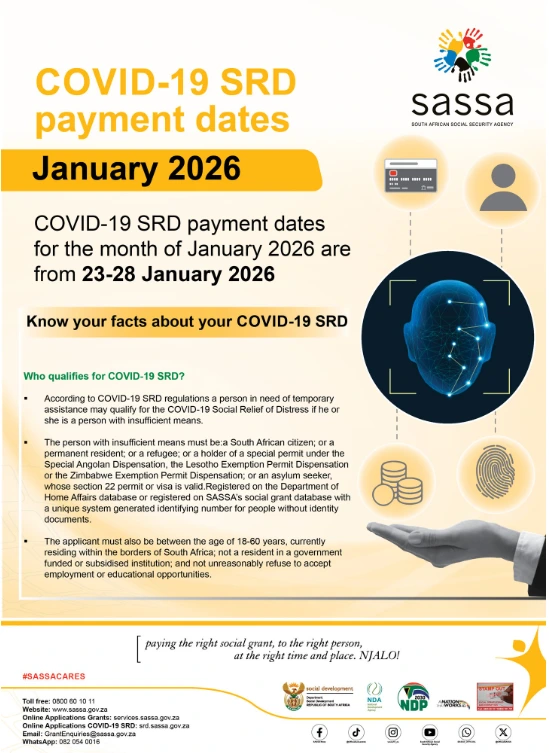
“The South African Social Security Agency (SASSA) has announced the payment dates for the COVID‑19 Social Relief of Distress (SRD) grant for January 2026. People who receive the grant can expect their payments to be processed between 23 January and 28 January 2026.
The infographic also repeats the rules for who qualifies for the SRD grant. It explains that the grant is meant for people who do not have enough income, who are between the ages of 18 and 60, and who are South African citizens, permanent residents, refugees, or holders of certain special permits.”
SASSA Other Grants Payment Dates for 2026
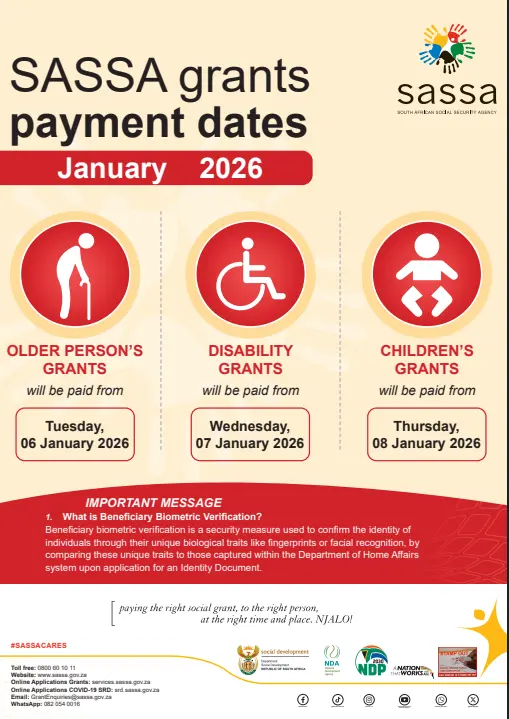
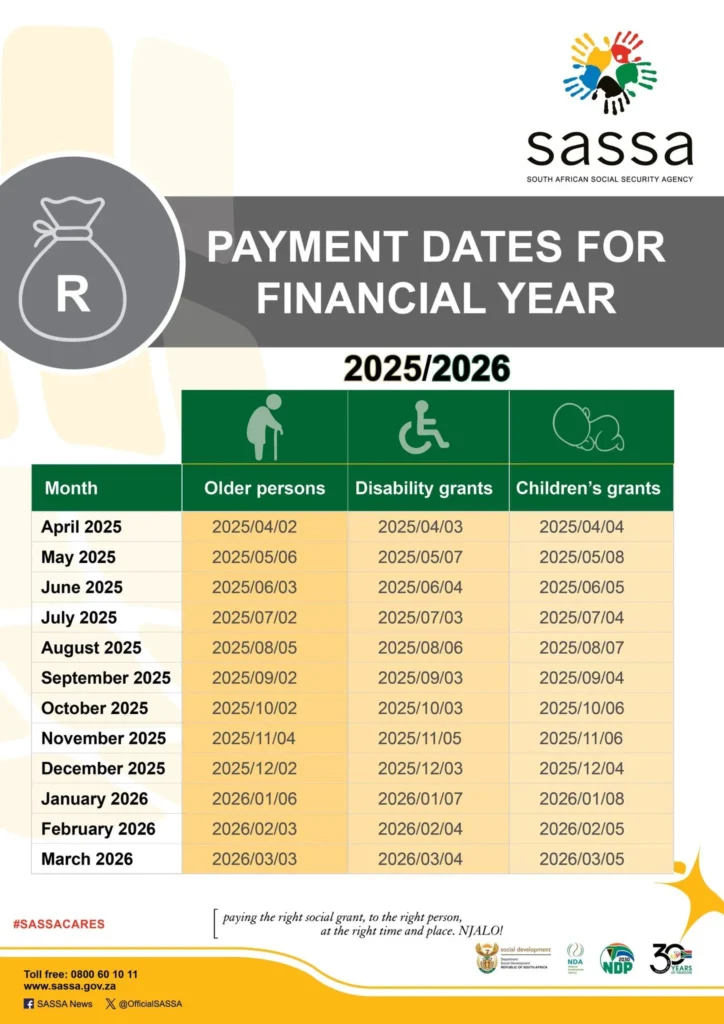
SASSA has confirmed the payment dates for social grants for the first three months of 2026. People who receive the Older Person’s Grant, Disability Grant, and Children’s Grants can start collecting their money from Tuesday, 06 January 2026. Please see the full payment schedule below for all dates and grant types
SASSA Social Grants Payment Schedule-2025/26
| SASSA Social Grants Payment Schedule – 2026 |
|---|
| Grant Type | Payday | Day | Time |
|---|---|---|---|
| Older Persons Grant | 6 January 2026 | Tuesday | 9:00 AM to 5:00 PM |
| Disability Grant | 7 January 2026 | Wednesday | 9:00 AM to 5:00 PM |
| Children’s Grants | 8 January 2026 | Thursday | 9:00 AM to 5:00 PM |
SASSA Grant Amounts 2025/2026 (Effective Oct 2025)
The following grant amounts are valid from October 2025. Please make sure that you are receiving the correct amount for your specific type of grant
| SASSA Grant Values |
|---|
| Grant Type | Amount (R) |
|---|---|
| SRD Grant (R370) | R370 |
| Old Age Grant (Below 75) | R2,320 |
| Old Age Grant (Above 75) | R2,340 |
| Disability Grant | R2,320 |
| War Veteran’s Grant | R2,340 |
| Care Dependency Grant | R2,320 |
| Foster Child Grant | R1,260 |
| Child Support Grant | R570 |
| Child Support Grant Top-Up | R850 (Total) |
| Grant-in-Aid | R570 |
SRD SASSA Grant Eligibility Criteria 2026
Before checking your status or reapplying, ensure you meet the current criteria:
- Citizenship/Residency: You must live in South Africa and be a South African citizen, permanent resident, refugee, or asylum seeker with a valid permit.
- Age: You must be 18 to 60 years old (not old enough for an old-age pension).
- Low or No Income: You must be unemployed or earn less than R624 per month.
- No Other Government Support: You must not receive other government help like UIF, NSFAS, or other grants (except Child Support Grant).
- Not in a Government Institution: You must not be in prison or in a state-funded place like a rehabilitation centre.
How to Apply for the SASSA SRD R370 Grant Online
If you have not yet applied, or need to reapply, follow these official steps carefully:
- Go to the official website: Visit srd.sassa.gov.za. Be careful of fake websites.
- Choose your ID type: Select “South African ID Holder” or “Asylum Seeker / Special Permit Holder.”
- Confirm your phone number: Enter your cellphone number. You will get an OTP (one-time PIN). Type it in to confirm.
- Fill in the application form: Complete the online form with correct details. Your names must match your ID exactly.
- Choose how you want to be paid: Select Bank transfer (best option, bank account must be in your name) or Retail Cash Send (Pick n Pay, Shoprite, etc.).
- Submit your application: Check all your information, then click Submit to send your application for approval.
All Official SASSA SRD Status Check Methods (2026)
Besides the tool at the top of this page, here are all the official ways to check (track) your R370 grant status:
1. Official SASSA SRD Website Portal (Direct Link)
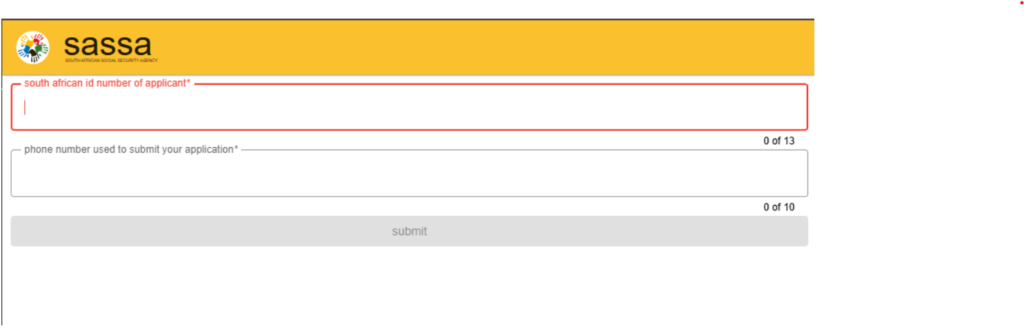
- Go to the official SASSA SRD website: srd.sassa.gov.za
- Find the section that says “Status Check” (it may also say “Check Online”).
- Type in your South African ID number and the phone number you used when you applied.
- Click the “Submit” or “Check Status” button.Wait for the page to load.
- Your SRD status for different months will appear on the screen.
2. SASSA WhatsApp Channel
- Save the official SASSA WhatsApp number.
Add 082 046 8553 to your phone contacts. - Open WhatsApp.
Start a new chat with the saved SASSA number. - Send a keyword.
Type “SASSA” or “Status” and send it. - Follow the messages
Reply by choosing the correct options. Enter your details.You will need your South African ID number and the phone number you used when you applied.
3. USSD Code (Offline Method)
- Open the “Phone” on your mobile.
- Dial *120*69277# or *120*3210# and press the call/send button.
- A menu screen will appear — follow the options shown.
- You will usually need to choose an option for “SASSA status” or “SRD status”.
- Enter your ID number and cellphone number when asked.
- Your SRD status result for the current period will then appear on the screen.
- You can save this USSD code on your phone as “SASSA Status” for future checks.Note: Standard USSD charges may apply
4. R370 Status Check via App
SASSA may sometimes release an official mobile app. To stay updated, visit the official SASSA website (https://srd.sassa.gov.za/) for any announcements about the app
- Download the app
- If an official app is available, get the SASSA app from the Google Play Store or Apple App Store. Make sure it is t
- Install and open: Wait until the app has finished downloading and installing, then open it.
- Register or log in: Sign up or log in if the app asks you to.
- Find the Status Check section: Go to the section called Status Check.
- Enter your details: Type in your South African ID number and the cellphone number you used when applying.
- Submit your request: Tap “Submit” or “Check Status”.
- View your results: Your SRD R370 grant status will appear on the screen. It will show if you are approved, declined, or still pending, along with any payment dates.
5. Via Email Enquiry
- Write a new email to grantenquiries@sassa.gov.za
- Subject line: SRD R370 Application Status Check
- Email message: Include your full South African ID number and your registered cellphone number
- Note: Replies by email can take 24–48 hours (or longer)
SRD Status Check payment dates methods for R370/R350 Status
Unlike other social grants that have fixed payment dates announced months in advance, the SASSA SRD R370 grant does not have the same payment date for everyone.
When your application for a specific month is approved, your status check will usually show a “Payday” or a payment period. This tells you when SASSA plans to pay your money.
Below are the main ways to check your SRD R370 payment date:
- Online SASSA SRD Status Check (Most Reliable)
- Using our tool: Enter your ID number and phone number in the status check form at the top of this page.If your grant is approved for that month, you should see your payment date if SASSA has already set one.
- Official SASSA SRD website: Go to the official SASSA SRD website. Enter your South African ID number and the mobile number you used when applying. If your status says “Approved”, it will often also show a payment date.
- SASSA WhatsApp Service
- Save the official SASSA WhatsApp number: 082 046 8553.
- Send “Status” or “SASSA” to this number and follow the instructions. If your application is approved and a date is available, the reply may show your payment date.
- USSD Code (Mobile Phone)
- Dial *120*3210# or *120*69277# from the phone you used to apply.
- Follow the instructions on the screen. If available, your status result may include your payment date. (Normal USSD costs may apply.)
Important Notes on SRD Payment Dates:
- End of the Month: SRD R370 payments are usually paid at the end of the month, not at the start.
- “Payday” Means Release Date: The Payday shown is when SASSA sends the money.It can take 2–3 working days for the money to reach your bank account or be available through Cash Send, depending on your payment method and bank.
- Check Regularly:Because payment dates are given only after approval each month, you must check your status often, especially from the middle of the month.
- No Fixed Schedule: Do not trust rumours or unofficial payment dates for the SRD R370 grant. Always check your own payday using an official SASSA status check.
- For general payment dates of other SASSA grants (Old Age, Disability, Child Grants), please see our SASSA Payment Dates page.
srd.sassa.gov.za Removed from Google
The sudden removal of the official srd.sassa.gov.za website from Google search results has caused worry for many beneficiaries.
Although the reason is not clear, you can still safely check your SRD grant status using official methods.
Do not use untrusted links from social media. Instead, use one of the two official and trusted methods below to check your information.
- A trusted independent status checker: For an easy and popular option, the independent platform srdsassas.com connects directly to the SASSA database and shows your latest status immediately.
Alternative link: srdsassas.com - The official SASSA portal (direct link): This is the safest option. Using the direct link takes you straight to the official government website without using search engines. This ensures the site is correct and secure.
Official link: https://srd.sassa.gov.za/sc19/status
By saving or using one of these two links, you can keep checking your application and payment dates without any problems.
SASSA SRD R370 Appeal Status Check
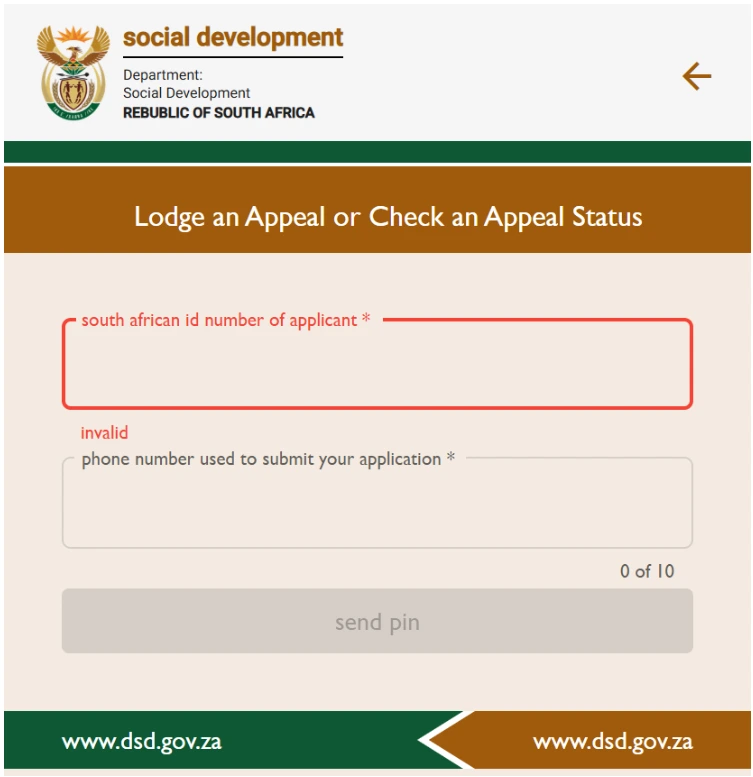
If you have submitted an appeal to the Independent Tribunal for Social Assistance Appeals (ITSAA) because your SRD R370 grant was declined, you can check your appeal status online at https://srd.sassa.gov.za/appeals/ using your ID number and phone number.
ITSAA reviews appeals independently from SASSA.
Follow these steps to check your SRD appeal status:
- Visit the official ITSAA appeals website:
Go to https://srd.sassa.gov.za/appeals/. This is the same website you used to submit your appeal. - Provide Your Identification Details:
Type in your 13‑digit South African ID number and the phone number you used when you applied for the SRD grant and submitted the appeal. - Submit your details:
Click “Send Pin” (or a similar button). You will receive an OTP (one‑time PIN) by SMS. Enter this PIN to continue. - Check your appeal status:
After logging in, you will see the current status of your appeal for the month(s) you appealed. Possible results are Pending, Approved (appeal successful), or Declined (appeal not successful)
Important Considerations for Appeal Status Checks:
- Appeal processing time: Appeal reviews can take time, usually 60 to 90 days, because each case is checked separately. Please be patient.
- Check regularly: You can check your appeal status from time to time on the portal.
- Contact ITSAA if needed: If your appeal has been pending for a very long time or the status is not clear, you may need to contact ITSAA directly using the contact details in the “Appeal SASSA SRD Status Application” section.
- Different from SASSA status: Appeal status is checked on the ITSAA portal, not on the main SASSA SRD status page. The SASSA status only updates after ITSAA makes a decision and SASSA updates its records.
How to Check Your SASSA Identity Verification Status for SRD R370
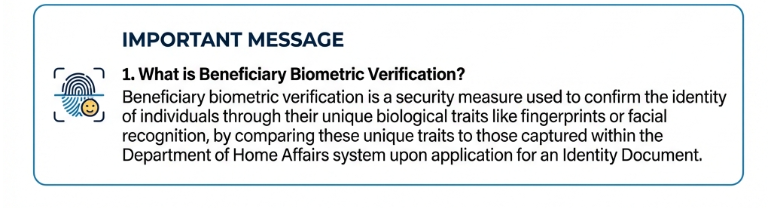
Identity verification is an important step in the SASSA SRD R370 grant application process. SASSA checks your personal details, mainly with the Department of Home Affairs (DHA), to confirm who you are and if you qualify.
Knowing your verification status helps make sure your application moves forward without problems.
There is no separate tool just to check identity verification. Your verification result is usually shown as part of your overall SRD application status. Here is how to understand it:
- Check your overall SRD status:
Do a normal SASSA status check using our tool at the top of this page or on the official SASSA SRD website (srd.sassa.gov.za). The result will often show if there is a problem with identity verification. - Look for these status messages:
Common statuses related to identity verification include:- “Pending DHA Verification” – SASSA is still checking your details with the Department of Home Affairs.
- “Identity Verification Failed” or “Referred” – There is a problem. Your details (ID number, name, or surname) do not match Home Affairs records.
- “Awaiting Identity Verification” – Identity checks are still outstanding.
- A “Pending” status for a long time can sometimes mean there is a delay with identity verification.
What to Do If You Suspect an Identity Verification Issue:
- Double‑check your application details: Make sure the ID number, full names, and surname you gave SASSA are exactly the same as on your South African ID or Home Affairs permit. Even small mistakes can cause verification to fail.
- Make sure Home Affairs records are updated: If your details changed recently (for example, surname after marriage) and Home Affairs has not updated them yet, this can cause problems. You may need to update your details with DHA first.
- Contact SASSA: If your status keeps showing an identity verification problem even though your details are correct, contact SASSA for help at 0800601011. In some cases, you may need to visit a SASSA office to fix the issue.
Passing identity verification is necessary for your SRD grant to be approved. Checking your status regularly helps you see if there are any verification problems.
SASSA Status Check Balance Information
How to Check Your SASSA SRD Balance
Many South Africans want to know how to check their SASSA SRD R370 grant balance. It is important to understand that the SRD grant is not like a bank account, so you cannot check a balance at any time. Instead, you check your status to see which months have been approved.
SASSA does not have a special “balance check” for the SRD grant. However, by using our SASSA Status Check tool at the top of this page, you can see your approved months and whether payment dates are shown.
Understanding Your Payments Through Status History
- Use our status check tool:
Enter your ID number and phone number in the tool above. The results will show your status for different months. - Check approved months:
Each month marked “Approved” means R370 was paid or will be paid for that month. - Check paydays:
If a payday is shown for an approved month, it shows when the money was or will be paid. - Estimate money still due:
You can look at approved months where payment has not yet shown in your bank account or via Cash Send to see what payments may still be outstanding.
Always check your status regularly to stay updated on your grant and make sure you do not miss any payments.
Update payment method for SASSA SRD grant
To get your monthly SASSA SRD R370 payment on time, make sure your payment method is set up correctly and that the bank account is in your own name. You can usually choose bank payment or Cash Send (if available) on the official SASSA SRD website. Follow these steps on the official SASSA SRD site:
- Visit the official SASSA SRD website:
Go to srd.sassa.gov.za and find the section called “How do I change my banking details?”. - Enter your ID number:
Type in your South African ID number to start. SASSA will send you an SMS with a secure link to the phone number you used to apply. - Click the SMS link:
Open the SMS and click the link. It will take you to a secure SASSA page to update your payment details. - Choose your payment method:
- Bank account: Enter your own bank details. The account must be in your name only. SASSA does not pay into someone else’s account.
- Cash Send: If available and you choose it, payments are made through selected retailers using your registered phone number.
- Confirm and submit:
Check that all details are correct and submit. You will receive confirmation once SASSA processes the update. Checking new bank details may take some time.
Eligibility Criteria for the SASSA SRD
Understanding the eligibility rules is important before you check your SRD status or apply for the R370 grant.
These rules can change, but the general requirements usually include:
- Citizenship or residency: You must be a South African citizen, permanent resident, or a refugee registered with Home Affairs.
- Age: You must be between 18 and 60 years old.
- No other SASSA grant: You must not receive any other SASSA grant, such as old age, disability, or child support grant for yourself.
- No UIF benefits: You must not receive UIF or qualify for UIF payments.
- No NSFAS funding: You must not receive NSFAS financial support.
- Low or no income: The current income limit is R620 per month.
- Not in prison: You must not be in a correctional facility.
- Valid South African ID: You need a valid 13‑digit South African ID number.
- Registered mobile number: You need a mobile phone number registered in your name for contact and verification.
SASSA checks this information using different government and financial databases. If your SRD status shows “Declined”, it is usually because you do not meet one or more of these requirements based on SASSA’s checks. You can find more details on our eligibility page.
Updating SASSA SRD Banking Details
Updating Your Banking Details for the R370 Grant
It is very important to keep your banking details updated with SASSA so that you receive your SRD R370 grant without problems. SASSA can only pay the money into a bank account that is in your own name. Below is the general process to change your banking details on the official SASSA SRD website:
Online via the Official SASSA SRD Website
- Visit the SASSA SRD website: Go to the official SASSA SRD portal (srd.sassa.gov.za). Do not use other websites to change banking details.
- Find the correct section: Look for “How do I change my banking details” or a similar option.
- Enter your ID number: Type in your 13‑digit South African ID number.
- Receive an SMS with a secure link: SASSA will send a secure link by SMS to the phone number you used when applying. This link is only for you.
- Open the secure link: Click the link in the SMS. It will take you to a secure SASSA page where you can enter your banking details (bank name, account number, branch code, account type).
- Submit and wait for verification: After submitting, SASSA will verify your banking details. This process may take some time before payments are made.
While the online method on the official SASSA SRD website is the main way, for some grants or special problems you may be asked to visit a SASSA office. Always check the correct steps through official SASSA channels. If you go to an office, remember to take your ID document and proof that the bank account belongs to you.
Important reminder: The bank account must be in your own name. SASSA will not pay money into someone else’s account. This is very important for your status check to result in payment.
SASSA Identity Verification Required
Successful identity verification is required for your SASSA SRD R370 grant application and status checks.
This step helps SASSA confirm that you are a real and eligible South African citizen, permanent resident, or qualifying refugee/asylum seeker, and helps prevent fraud.
How SASSA Verifies Your Identity
SASSA checks the personal details you give (mainly your ID number, name, and surname) against records from the Department of Home Affairs (DHA).This check is done automatically as part of reviewing your application.
Ensuring Your Details are Ready for Verification
To help SASSA verify your details easily, it is important that all your information is correct.
- Correct information:
Make sure your ID number, full names, and surname are written exactly the same as on your South African ID or Home Affairs permit when you apply or deal with SASSA.
Updated Home Affairs records:If your details have changed (for example, a new surname after marriage) and Home Affairs has not updated them, this can cause verification problems. Make sure your DHA records are up to date.
Proceed to Verification Guidance
Before you apply, or if you are having problems, make sure your details are correct for SASSA’s verification system. Our verification page explains what is needed and what steps you can take to prepare your information.
Understand & Complete SRD R370 Identity Verification
SASSA Status Check : Statuses
When you check your SRD R370 grant status, you will see different application results.
Each status shows what is happening with your application and tells you if your grant is approved, pending, declined, or if you need to do something. Understanding these statuses helps you manage your SRD grant.
Below are the most common SASSA SRD application statuses and what they usually mean:
- Pending: Your application is still being checked by SASSA. They are verifying your details with departments like Home Affairs, SARS, and UIF. You usually do not need to do anything. Check your status again later.
- Approved: Your SRD R370 grant for the listed month(s) is approved. Your status will also show a Payday or payment period, which tells you when the money should be paid.
- Declined: Your application was not approved. A reason must be shown, such as:
- Alternative income found: You earn more than R620 per month.
- Identity verification failed: Your details do not match Home Affairs records.
- UIF registered: You are receiving UIF benefits.
- NSFAS registered: You are receiving student financial aid.
- Reapplication required / Awaiting reapplication: For some periods, SASSA may ask you to apply again. If you see this status, you must submit a new application on the official SASSA SRD website.
- Bank details pending / Banking details update required: Your grant may be approved, but SASSA needs correct banking details. Update your details on the official SRD website. The bank account must be in your name.
- Referred / Identity verification failed / Pending DHA verification: There is a problem matching your ID, name, or surname with Home Affairs or other databases. This may be temporary, but if it continues, you need to fix your details with DHA or SASSA.
- Cancelled: Your application was cancelled. This may be because you cancelled it yourself, or SASSA cancelled it due to changes like income found or other reasons.
- Application complete / Submitted: SASSA has received your application. This status usually changes to Pending or another result as processing continues.
SASSA SRD Status Appeal
Getting a declined result for your SRD R370 grant can be upsetting. However, you still have the right to appeal the decision. An appeal means your application will be checked again if you believe it was wrongly declined.
The appeal process is handled by the Independent Tribunal for Social Assistance Appeals (ITSAA).
ITSAA is separate from SASSA, so they review your case independently and fairly using the grant rules.
Key Information for Your SRD R370 Appeal:
- Understand why you were declined: Before you appeal, check the reason SASSA gave for declining your application. Knowing the reason helps you explain why you believe the decision is wrong or based on old information.
- Act quickly: You normally have 30 days from the date your application was declined to submit an appeal. In some cases, appeals may be accepted up to 90 days, but it is best to appeal as soon as possible. You must submit a separate appeal for each month that was declined.
- Where and how to appeal: All SRD R370 appeals must be submitted online to ITSAA. You cannot appeal at a SASSA office or by emailing SASSA. Use the official appeal website: https://srdsassas.com/appeals/
- What you will need:
- Your 13‑digit South African ID number
- The phone number you used when you applied for the SRD R370 grant
- The appeal process: On the appeal website, enter your ID number and phone number. Select the month(s) you want to appeal for and follow the instructions on the screen.If there is a space to explain your appeal, clearly state why you think the decision was wrong. ITSAA will use SASSA’s records and may do extra checks.
- After you submit your appeal:ITSAA will review your appeal. This can take 60 to 90 days.You can check your appeal status on the same website. If your appeal is approved, SASSA will pay you for the approved month(s).If it is declined, ITSAA will give a reason for the decision.
Important Points to Remember:
- Monthly appeals: You must submit a separate appeal for each month that SASSA declines your application if you do not agree with the decision. The SRD grant is checked every month.
- Appeal result: ITSAA will inform you of the appeal result electronically, usually within 60 to 90 days after you submit the appeal.
- Reassessment process: ITSAA will review SASSA’s decision again using available information. This includes checking income and other financial support through databases used by SASSA. The income limit is R620 per person per month.
- Track your appeal: You can check your appeal status on the SRD DSD Appeal website.
Finality of Decision and Further Recourse:
The decision made by the Independent Tribunal is final, and you cannot appeal again through SASSA or the Department of Social Development.
If you are not satisfied with the Independent Tribunal’s decision, you can take the matter to the High Court for a legal review. This must be done within 180 days from the date of the Tribunal’s decision.
For Further Assistance on SRD declined status appeal
If you need more help or have questions about your appeal, you can contact the Independent Tribunal for Social Assistance Appeals (ITSAA):
Department of Social Development
Independent Tribunal for Social Assistance Appeals (ITSAA)
Private Bag X901, Pretoria, 0001
Tel: 012 312 7727
Email: grantappeals@dsd.gov.za
Fax: 086 534 3124 or 086 216 371
Visit our appeals page to find guidance and more information on how to handle your specific issue.
Troubleshooting Common SRD status Issues
Having problems when checking your grant status can be frustrating. Below is a short list of common problems and simple first steps to fix them.
Why is my SASSA money not in?
If your status shows approved but you have not received the money, these may be the reasons:
- Processing delay: Payments are made in groups. Check your status to see if a Payday is shown.
- Incorrect banking details: The bank account must be in your name. If the account is closed or the details did not pass checks, your status may show “Banking Details Pending.”
- Identity verification failed: If SASSA cannot confirm your ID with Home Affairs (for example, after a name change), your payment will be stopped.
- Means test failed: If more than R620 goes into your bank account in one month, you may be marked as having an “Alternative Income Source.”
Need more help? Remember to visit our Common SRD Status Check Issues page for detailed help and more guidance.
SASSA SRD Payment Insights & Statistics
Understanding how grants are paid can help you understand your grant status.
While SASSA keeps the exact and up‑to‑date numbers, general trends show how big the SRD R370 grant programme is.
Every month, millions of people check their status, and payments are made to those who qualify.
The number of payments each month depends on things like:
- The number of new and existing applications.
- How successful the verification checks are (income, identity, etc.).
- The budget available for the SRD grant.
- SASSA’s processing speed and timelines.
- How correct applicants’ banking details are.
Note: The chart above is only an example to show general payment patterns. Real payment numbers change and are controlled by SASSA. Checking your own status is the best way to know your exact payment situation.
Need Help with Your SASSA SRD Status? How to Contact SASSA
If you’ve checked your SRD status online and are still facing unresolved issues, discrepancies, or have urgent queries that the online system cannot address, you’ll need to contact SASSA directly.
Before you contact SASSA, please make sure you have the following information ready:
- Your 13‑digit South African ID number.
- The cellphone number you used for your SRD application.
- A clear explanation of your SRD problem (for example: “Approved but no payment received by [date]”, “Declined for UIF but I do not receive UIF”, or “Cannot update banking details”).
- Any reference numbers if you have contacted SASSA before.
Recommended SASSA Contact Methods for SRD Status Issues:
- SASSA SRD Grant Website (for specific actions):
Website: srd.sassa.gov.za
Although it is not a direct way to contact SASSA for general questions, this is the main official website used for:
- Checking your official SRD status.
- Updating your banking details (if this option is available to you).
- Submitting an appeal if your application is declined.
Many problems can be fixed by using the correct option on this website.
- SASSA Toll‑Free Helpline (for direct help):
Phone: 0800 60 10 11
This is the main call centre for grant questions, including the SRD grant.
- Best for: Complicated SRD status problems, payment questions after your payday has passed, understanding decline reasons if they are not clear, or when online options did not work.
- Availability: Usually Monday to Friday, 8:00 AM to 4:00 PM. Be ready to wait, especially during busy times.
3. SASSA WhatsApp Line (for status and basic questions):
Number: 082 046 8553 (Save this number and send “SASSA” or “Status”)
- Best for: Quick status checks when the website is not working, and simple SRD‑related questions. It may not help with complicated personal problems.
4. SASSA General Enquiries Email (for less urgent questions):
Email: grantsenquiries@sassa.gov.za
- Best for: Sending a formal question if you prefer writing or need to include documents (first check if they accept attachments for SRD issues).
- Note: Replies by email can take a long time and are not good for urgent SRD problems
Other Official SASSA Channels (General Information & Announcements):
Official SASSA Website:
www.sassa.gov.za (For general information about all SASSA grants and services, not for specific SRD actions.)
Official Social Media (News and updates, not for personal cases):
You can follow verified SASSA pages on Facebook (SASSANewsZA) and Twitter/X (@OfficialSASSA) for general news and announcements. These platforms are not usually used to fix individual SRD status problems.
Physical SASSA Offices & Head Office:
You can visit a local SASSA office for help, but SRD grant issues are usually better handled online or through the SRD contact channels first. Going to an office may be needed for identity verification problems that cannot be fixed online.
National Head Office Address (for formal letters, not general SRD questions):
SASSA House, 501 Prodinsa Building, Corner Pretorius and Steve Biko Streets, Pretoria, Gauteng, 0001, South Africa.
Tips for Effective Communication with SASSA:
- Be clear and short when explaining your SRD status problem.
- Be patient and polite, especially when you call the helpline.
- If you receive a reference number, keep it safe for future follow‑ups.
SASSA Status Check FAQ
Here are answers to some common questions about checking your SASSA status and the SRD R370 grant. Click on a question to see the answer.
This ‘Declined’ reason means SASSA found that you earn more than the limit allowed for the SRD grant. Your income could come from a job (checked through SARS) or other sources you reported
If you are employed, you can still apply for the SASSA SRD grant (R350). Whether you qualify for the SRD grant depends on several factors, including your total income and other assets
You can your SASSA SRD R370 status on your mobile phone by dialing *120*3210# or *120*69277#. You do not need an active internet connection or data to check your SASSA Status by this method.
SRD grant payment dates change every month. There is no fixed day or date each month.
No, there are specific criteria. The SRD grant is meant for people with low income, people with disabilities, special‑needs children, or individuals who are unemployed.
The SRD grant is paid to low-income asylum seekers or students with bursaries who meet the eligibility criteria for the SASSA SRD grant. In short, yes, students can also use the SASSA SRD program as financial assistance
- 1. There might be a delay between approval and the actual payment date (check the ‘Pay Date’).
- Your bank details could be wrong, missing, or not verified. Update them on the official SASSA SRD website.
- Bank processing times can vary (usually 2–3 working days after SASSA processes the payment).
- In rare cases, there may be a system issue. Contact SASSA if the delay is excessive after the pay date
Yes, if you have their South African ID number and the phone number they used for their SRD application — and most importantly, their clear permission to do so. Remember, you are handling their personal information
You usually have 30 to 90 days from the date you receive the declined status to submit an appeal to the Independent Tribunal for Social Assistance Appeals (ITSAA). Always check the official ITSAA website through the SASSA SRD portal for the exact deadline for the month you are appealing
“No, the status check tool and all information on SASSA Status Check are completely free for users
This can make it harder to check your status and receive messages or secure links from SASSA. You need to update your phone number through SASSA’s official channels. This usually means contacting them directly or visiting an office, because changing key contact details is a sensitive process